specplot_gallery
Read a list of SPEC data files (or directory(s) containing SPEC data files) and plot images of all scans. specplot_gallery will store these images in subdirectories of the given base directory (default: current directory) based on this structure:
{base directory}
   /{year}
      /{month}
         /{spec file name}
             /index.html
              s00001.png
              s00002.png
The year and month are taken from the SPEC data file when the data were collected. The plot names include the scan numbers padded with leading zeroes to five places (so the file names sort numerically).
The results will be shown as a WWW page (index.html) of thumbnail images and a separate list of any scans that could not generate plots. A reason will accompany these scans, as shown in the example.
How to use specplot_gallery: command line
Here is an example:
user@host ~$ specplot_gallery -d ./__demo__ ../src/spec2nexus/data/33bm_spec.dat
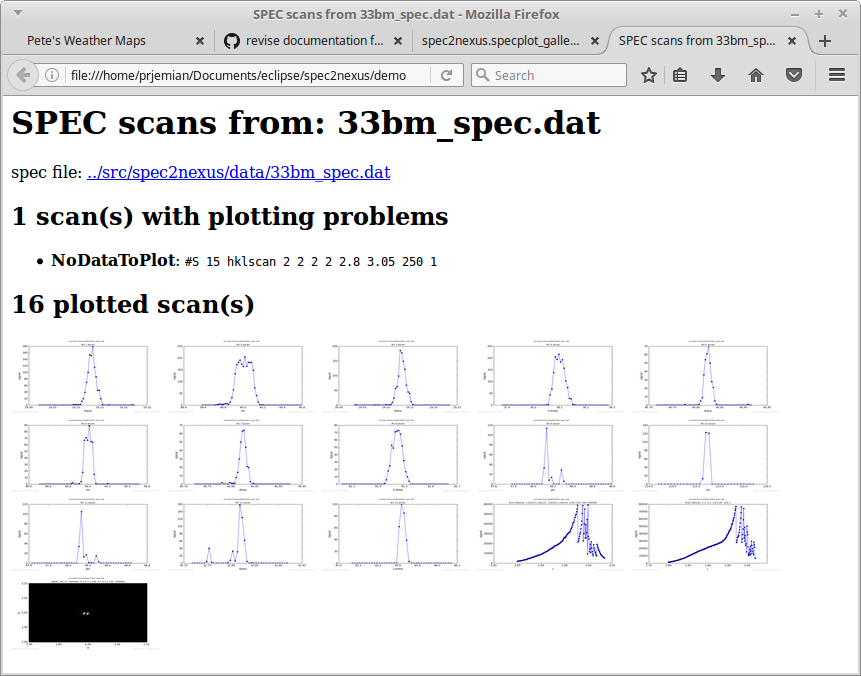
Example of specplot_gallery showing scans from test file 33bm_spec.dat.
Note that one of the scans could not be plotted. Looking at the data file, it shows there is no data to plot (this particular scan was aborted before any data was collected):
#C Wed Jun 16 19:00:10 2010. Scan aborted after 0 points.
The last scan shown is from a hklmesh (2-D) scan. It is mostly a constant background level, thus the large black area.
Each of the plots in the web page can be enlarged (by clicking on it).
How to use specplot_gallery: periodic background task (cron)
This script could be called from a Linux background task scheduler (cron) entry. To add the entry, type the crontab -e command which opens the task list in a screen editor and add lines such as these to the file:
# every five minutes (generates no output from outer script)
0-59/5 * * * *  /path/to/specplot_gallery.py -d /web/page/dir /spec/data/file/dirs
If the specplot_gallery script is called too frequently and the list of plots to be generated is large enough, it is possible for more than one process to be running. In one extreme case, many processes were found running due to problems with the data files. To identify and stop all processes of this program, use this on the command line:
kill -9 `ps -ef | grep python | awk '/specplot_gallery.py/ {print $2}' -`